Logging and Monitoring
MigratorXpress uses two logging systems: a tracking database (SQL Server or PostgreSQL) for structured migration history, and log files plus console output for operational details.
Database Logging
The migration tracking database records every step of a migration for auditing, resumability, and troubleshooting. Either SQL Server or PostgreSQL can host it -- the tables and behavior are the same on both backends. The dialect is detected from the ds_type of the entry referenced by --migration_db_auth_id. On PostgreSQL the tracking tables live in the public schema; on SQL Server they are created in the login's default schema (normally dbo).
Database Schema Overview
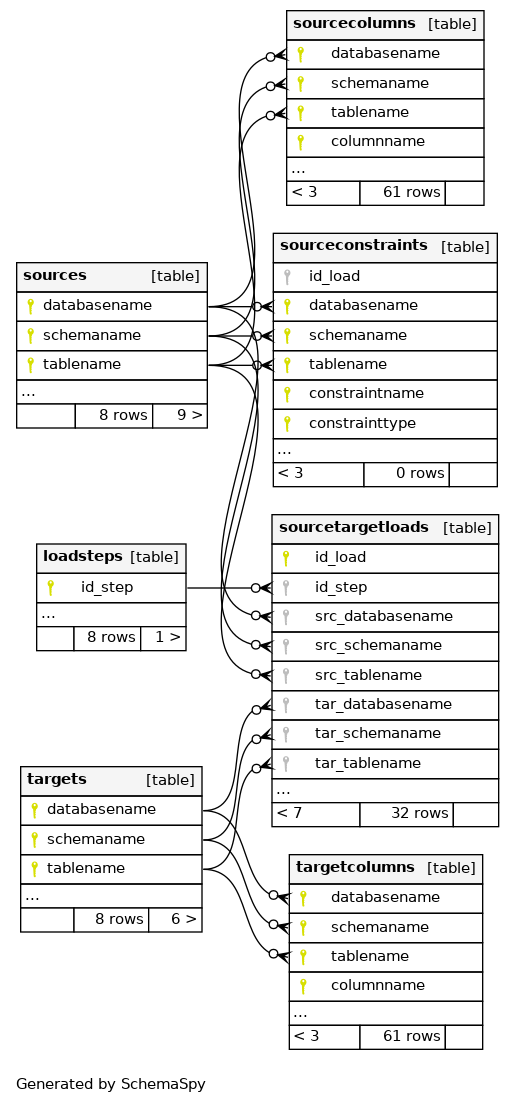
Primary keys are marked with key symbols and relationships show cardinality (1:N). Since 0.7.0, run_id is part of the primary key of the catalog tables (sources, sourcecolumns, sourceconstraints, targets, targetcolumns): every run keeps its own metadata snapshot.
Key Tables
sources
One row per discovered source table and run: databasename, schemaname, tablename, run_id, datediscovery, nbrows, nbrows_estimate, nbcolumns, lasttransferstatus, and the incremental watermarks nz_last_xid (Netezza) and or_max_rowid (Oracle).
targets
One row per target table and run (with a PostgreSQL target, schema and table names are stored in lower case): databasename, schemaname, tablename, run_id, nbrows, nbrows_estimate, nbcolumns, diff_count.
sourcecolumns / targetcolumns
Column-level metadata per table and run: columnname, coldatatype, collength, colprecision, colscale, isnullable, ordinalposition, and profiling statistics (countdistinct, valmin, valmax, valavg, valcountnull). targetcolumns holds the translated (target) data types.
loadsteps
Reference list of steps (id_step, desc_step): 0 source_table_discovery, 1 source_data_types_translation, 2 target_table_creation, 3 data_transfer, 4 source_target_tables_comparison, 5 apply_constrainsts_pk, 6 apply_constrainsts_ak, 7 apply_constrainsts_fk.
sourcetargetloads
One job per table and task: id_load, id_step, run_id, project, src_databasename, src_schemaname, src_tablename, tar_databasename, tar_schemaname, tar_tablename, and status (NULL/NOT STARTED before the job runs, then STARTED, DONE, or FAILED). --resume re-processes the jobs of a run that are not DONE.
eventlog
Event log for migration activity: eventtimestamp, eventrunid, eventloglevel (info, error, ...), id_step, eventstatus (STARTED, DONE, FAILED), elapsedtimeseconds, source and target database/schema/table names, eventmessage (error text on failure), and project.
sourcetargetdiff
Results of the diff task, one row per compared item: id_load, source and target table and column names, diff_timestamp, diff_type, diff_outcome (true when source and target match), run_id, project. The v_sourcetargetdiff view joins it with the source and target statistics.
sourceconstraints
Constraint metadata read from the source (Oracle, PostgreSQL or SQL Server) for copy_pk/copy_ak/copy_fk: constraintname, constrainttype, columnlist, constraintdefinition, refschemaname, reftablename, refcolumnlist, run_id.
File-Based Logging
Each migration run creates a log file for detailed operational tracing.
Naming Pattern
mig_YYYYMMDD_HHMMSS_<run_id>.log
The date and time are the local start time; <run_id> has the format YYYYMMDD-<uuid4>, for example mig_20260115_093012_20260115-0f8c4a8e-6c1f-4f5e-9b55-7d6f1c2e9a10.log. A resumed run writes a new file with the original run ID.
The file is opened as soon as the run ID is known (after the tracking database setup), so the first messages of a run (banner, license and configuration) appear on the console only.
Log Format
Each line contains a timestamp, the log level, the process ID and the process name:
[YYYY-MM-DD HH:mm:ss.SSS+TZ :: LEVEL :: PID :: ProcessName] Message
Sample Output
[2026-01-15 09:30:12.145+01:00 :: INFO :: 8421 :: MainProcess] Log file path: /var/log/migratorxpress/mig_20260115_093012_20260115-0f8c4a8e-6c1f-4f5e-9b55-7d6f1c2e9a10.log
[2026-01-15 09:30:12.385+01:00 :: INFO :: 8421 :: MainProcess] *** Source table selection ***
[2026-01-15 09:30:13.102+01:00 :: INFO :: 8421 :: MainProcess] ========== Step 'translate' across all schemas ==========
[2026-01-15 09:31:40.556+01:00 :: INFO :: 8421 :: MainProcess] ===========================================================================
[2026-01-15 09:31:40.556+01:00 :: INFO :: 8421 :: MainProcess] RUN SUMMARY: 41/42 tables succeeded
[2026-01-15 09:31:40.556+01:00 :: INFO :: 8421 :: MainProcess] ===========================================================================
[2026-01-15 09:31:40.556+01:00 :: INFO :: 8421 :: MainProcess] Failed tables:
[2026-01-15 09:31:40.556+01:00 :: INFO :: 8421 :: MainProcess]   - SALES.ORDERS_ARCHIVE                     [transfer]
The RUN SUMMARY block at the end of a run lists the tables that failed and the task(s) where they failed. When tables failed, the run then logs run <run_id> finished with failed tables, exit code 40; use --resume <run_id> to retry them (exit code 41 when every table failed). See Exit Codes.
FastTransfer command
For each table, the fasttransfer command line logs the FastTransfer call. Since 0.7.2 it starts with the absolute path of the FastTransfer executable and is rendered with shell quoting (POSIX quoting on Linux, Windows command-line quoting on Windows), instead of the former ./FastTransfer --option "value" string. Update log parsers written for 0.7.1.
Passwords and connection strings of the source and target entries are replaced by ********** in this line, in every logged line of FastTransfer's output, in connection error messages and in the event log (eventlog.eventmessage).
Log Levels
Set via --log_level (case-insensitive):
| Level | Description |
|---|---|
DEBUG | SQL queries, FastTransfer commands, detailed diagnostics |
INFO | Progress, row counts, task completion (default) |
WARNING | Non-critical issues |
ERROR | Failures preventing a table from migrating |
CRITICAL | Errors that stop the run or a step |
The same level applies to the console and to the log file.
Log Location
Defaults to the current working directory. Override with --log_dir (the directory is created if it does not exist):
./MigratorXpress --log_dir /var/log/migratorxpress \
  --auth ./credentials.json \
  ...
Terminal Output
Logs are mirrored to the terminal (stdout) with the same format; the timestamp, level, process ID and process name fields are colorized. Use --quiet_ft to hide FastTransfer's own output from the console (it is still written to the log file), --no_progress to disable the progress lines, and --no_banner to suppress the startup banner.
Monitoring Best Practices
During migration
- Watch the terminal for real-time progress on each table.
- Use
--n_jobs 1for initial test runs so log output is sequential and easier to follow. - Set
--log_level DEBUGto capture SQL statements when diagnosing issues.
After migration
- Read the
RUN SUMMARYblock at the end of the log. - Query the
sourcetargetloadstable for per-table job status. - Query the
eventlogtable for error messages and elapsed times. - Query
sourcetargetdiff/v_sourcetargetdifffor thediffresults.
Resuming failed runs
If a migration is interrupted or some tables failed, the tracking database preserves the state of each job. Use --resume with the run ID to finish it -- only jobs that are not DONE are reprocessed:
./MigratorXpress --auth ./credentials.json \
  --source_db_auth_id oracle_prod \
  --target_db_auth_id mssql_target \
  --migration_db_auth_id ms_mig_log \
  --resume 20260115-0f8c4a8e-6c1f-4f5e-9b55-7d6f1c2e9a10
Integration with Monitoring Tools
Log file ingestion
MigratorXpress log files use a structured format that can be parsed by log aggregation tools:
- Filebeat / Logstash -- configure a file input pointing to
mig_*.logwith a grok pattern for the bracket-delimited format. - Fluentd -- use a regexp parser matching
\[(?<time>[^\]]+) :: (?<level>\w+) :: (?<pid>\d+) :: (?<context>[^\]]+)\] (?<message>.*). - Splunk -- index the log directory and create field extractions for timestamp, level, PID, and process name.
Database queries for dashboards
Connect your monitoring tool (Grafana, Power BI, etc.) directly to the migration tracking database. These queries work on both SQL Server and PostgreSQL.
-- Failed jobs of a run, with their error message
SELECT e.src_schemaname, e.src_tablename, l.desc_step, e.eventmessage, e.eventtimestamp
FROM eventlog AS e
JOIN loadsteps AS l ON l.id_step = e.id_step
WHERE e.eventrunid = 'YOUR_RUN_ID'
  AND e.eventstatus = 'FAILED'
ORDER BY e.eventtimestamp DESC;

-- Transfer duration and throughput per table
SELECT e.src_schemaname, e.src_tablename, s.nbrows_estimate, e.elapsedtimeseconds,
       s.nbrows_estimate / NULLIF(e.elapsedtimeseconds, 0) AS est_rows_per_second
FROM eventlog AS e
JOIN sources AS s
  ON s.databasename = e.src_databasename
 AND s.schemaname = e.src_schemaname
 AND s.tablename = e.src_tablename
 AND s.run_id = e.eventrunid
WHERE e.eventrunid = 'YOUR_RUN_ID'
  AND e.id_step = 3
  AND e.eventstatus = 'DONE'
ORDER BY e.elapsedtimeseconds DESC;

-- Columns whose diff failed
SELECT src_schemaname, src_tablename, src_columnname, diff_type
FROM sourcetargetdiff
WHERE run_id = 'YOUR_RUN_ID'
  AND diff_outcome = 0;   -- PostgreSQL: diff_outcome = false
See Also
- CLI Reference --
--log_level,--log_dir, and other options - Troubleshooting -- common issues and solutions