Logging and Monitoring
MigratorXpress uses two logging systems: a tracking database (SQL Server or PostgreSQL) for structured migration history and log files for operational details.
Database Logging
The migration tracking database records every step of a migration for auditing, resumability, and troubleshooting. Either SQL Server or PostgreSQL can host it -- the schema and behavior are identical across both backends. The dialect is auto-detected from the ds_type of the entry pointed to by --migration_db_auth_id. On PostgreSQL the tracking tables live in the public schema; on SQL Server they live in dbo.
Database Schema Overview
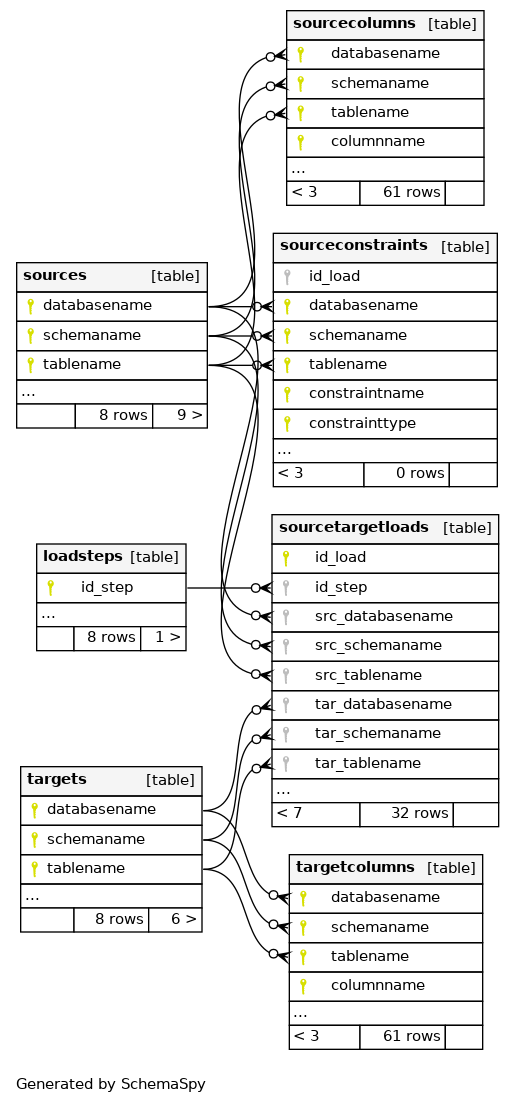
Primary keys are marked with key symbols and relationships show cardinality (1:N).
Key Tables
sources
Source database metadata:
- Source identifier and database type
- Connection details (server, port, database)
- Schema name and discovery timestamp
- Table count and total row count
targets
Target database metadata:
- Target identifier and database type
- Connection details (server, port, database)
- Schema name
- Creation timestamp
sourcecolumns
Column-level metadata from the source:
- Table and column name (composite key)
- Source data type, precision, scale
- Ordinal position, length, nullability
- Primary key flag
targetcolumns
Column-level metadata for the target:
- Table and column name (composite key)
- Translated data type, precision, scale
- Ordinal position, length, nullability
- Mapping from source column
sourcetargetloads
Per-table transfer tracking:
- Source and target table identification
- Transfer status (pending, running, completed, failed)
- Row counts (source, transferred, validated)
- Start and completion timestamps
- Transfer method and parallel degree
- Error messages on failure
- Resume checkpoint data
eventlog
Event log for migration activity:
- Log ID and timestamp
- Migration run identifier
- Log level (INFO, WARNING, ERROR, DEBUG)
- Event type and status
- Table context (schema, table)
- Event message and error details
- Elapsed time in seconds
sourceconstraints
Constraint metadata from the source:
- Constraint name and type (PK, AK, FK)
- Source table and columns
- Referenced table and columns (for FKs)
- Copy status and timestamp
File-Based Logging
Each migration run creates a log file for detailed operational tracing.
Naming Pattern
migratorxpress_YYYYMMDD_HHMMSS_<run_id>.log
Log Format
Structured format with timestamp, log level, process ID, and context:
[YYYY-MM-DD HH:MM:SS.fff+TZ :: LEVEL :: PID :: Context] Message
Sample Output
[2026-01-15 09:30:12.145+01:00 :: INFO :: 8421 :: MainProcess] Log file path: /var/log/migratorxpress/migratorxpress_20260115_093012_a1b2c3d4.log
[2026-01-15 09:30:12.146+01:00 :: INFO :: 8421 :: MainProcess] **** Starting migration run ****
[2026-01-15 09:30:12.147+01:00 :: INFO :: 8421 :: MainProcess] Source: Oracle - ORCL.SALES
[2026-01-15 09:30:12.148+01:00 :: INFO :: 8421 :: MainProcess] Target: PostgreSQL - analytics.sales
[2026-01-15 09:30:12.250+01:00 :: INFO :: 8421 :: MainProcess] Discovered 42 tables for migration
[2026-01-15 09:30:12.385+01:00 :: INFO :: 8421 :: MainProcess] Task list: translate create transfer diff
[2026-01-15 09:30:13.102+01:00 :: INFO :: 8421 :: Worker-1] Translating DDL: ORDERS
[2026-01-15 09:30:13.456+01:00 :: INFO :: 8421 :: Worker-1] Creating table: sales.orders
[2026-01-15 09:30:14.210+01:00 :: INFO :: 8421 :: Worker-1] Transferring: ORDERS (estimated 1.2M rows)
[2026-01-15 09:30:36.721+01:00 :: INFO :: 8421 :: Worker-1] Transfer completed: ORDERS - 1,234,567 rows in 22.511s
[2026-01-15 09:30:37.102+01:00 :: INFO :: 8421 :: Worker-1] Diff: ORDERS - source=1,234,567 target=1,234,567 OK
Log Levels
Set via --log_level:
| Level | Description |
|---|---|
DEBUG | SQL queries, FastTransfer commands, detailed diagnostics |
INFO | Progress, row counts, task completion (default) |
WARNING | Non-critical issues such as type conversion fallbacks or schema differences |
ERROR | Failures preventing a table from migrating |
CRITICAL | Fatal errors stopping the entire run |
Log Location
Defaults to the current working directory. Override with --log_dir:
./MigratorXpress --log_dir /var/log/migratorxpress \
  --auth ./credentials.json \
  ...
Terminal Output
Logs are mirrored to the terminal with color coding:
- Green -- success messages (table created, transfer completed)
- Yellow -- warnings (type conversion fallback, schema mismatch)
- Red -- errors (transfer failed, connection lost)
- Cyan -- informational messages (discovery, progress)
Monitoring Best Practices
During migration
- Watch the terminal for real-time progress on each table.
- Use
--n_jobs 1for initial test runs so log output is sequential and easier to follow. - Set
--log_level DEBUGto capture SQL statements when diagnosing issues.
After migration
- Query the
sourcetargetloadstable for per-table transfer status and row counts. - Query the
eventlogtable for errors and warnings. - Use the
difftask to validate row counts and content between source and target.
Resuming failed runs
If a migration is interrupted, the tracking database preserves the state of each table. Use --resume to pick up from where it stopped -- only tables that did not complete successfully are reprocessed.
./MigratorXpress --auth ./credentials.json \
  --source_db_auth_id oracle_prod \
  --source_schema_name SALES \
  --target_db_auth_id postgres_dev \
  --target_schema_name sales \
  --migration_db_auth_id ms_mig_log \
  --resume
Integration with Monitoring Tools
Log file ingestion
MigratorXpress log files use a structured format that can be parsed by log aggregation tools:
- Filebeat / Logstash -- configure a file input pointing to
migratorxpress_*.logwith a grok pattern for the bracket-delimited format. - Fluentd -- use a regexp parser matching
\[(?<time>[^\]]+) :: (?<level>\w+) :: (?<pid>\d+) :: (?<context>[^\]]+)\] (?<message>.*). - Splunk -- index the log directory and create field extractions for timestamp, level, PID, and context.
Database queries for dashboards
Connect your monitoring tool (Grafana, Power BI, etc.) directly to the migration tracking database. The examples below use SQL Server syntax; the equivalent on PostgreSQL is shown alongside.
-- Tables with errors (portable)
SELECT source_table, error_message, started_at
FROM sourcetargetloads
WHERE status = 'failed'
ORDER BY started_at DESC;

-- Transfer throughput -- SQL Server
SELECT source_table, row_count,
       DATEDIFF(SECOND, started_at, completed_at) AS duration_seconds,
       row_count / NULLIF(DATEDIFF(SECOND, started_at, completed_at), 0) AS rows_per_second
FROM sourcetargetloads
WHERE status = 'completed'
ORDER BY rows_per_second DESC;

-- Transfer throughput -- PostgreSQL
SELECT source_table, row_count,
       EXTRACT(EPOCH FROM (completed_at - started_at)) AS duration_seconds,
       row_count / NULLIF(EXTRACT(EPOCH FROM (completed_at - started_at)), 0) AS rows_per_second
FROM sourcetargetloads
WHERE status = 'completed'
ORDER BY rows_per_second DESC;
See Also
- CLI Reference --
--log_level,--log_dir, and other options - Troubleshooting -- common issues and solutions